How Much of Your Dashboard Is Just the Mess You Never Cleaned?
Olympia Tsamoura · 18 October 2026. AI dashboards build a chart in seconds from plain English. They will just as happily chart data that is wrong, and now that building is instant, the mess has nowhere left to hide.
The orders dataset used here is the one cleaned step by step in Cleaning data with SQL, which walks through the parsing, deduplication and flagging behind the cleaned report.
The promise, and the catch
You describe what you want to see, and the tool draws it. No SQL, no waiting a week for a report. For anyone who has ever queued behind a data team, this feels like a gift.
The catch is old and simple: garbage in, garbage out. The dashboard will chart whatever you give it. It will not tell you the numbers are wrong. It will not notice that “Shipped” and “shipped” are the same thing, that a price of €80.42 never made it into the total, or that a shipping date lands before its order date. It renders all of it, cleanly, with confidence.
Those problems were always there. We just used to hide them. When a dashboard took two weeks to build, someone cleaned the data in a spreadsheet along the way, quietly, and nobody saw the mess. Now the chart appears in seconds, before anyone has cleaned anything, so the mess appears too. That is the real shift: AI dashboards are not creating data-quality problems, they are making the ones we always had impossible to ignore.
The experiment: one dataset, charted twice
To show the gap rather than just assert it, I built one dataset of 5,000 online orders and two products tables, then answered the same four business questions twice: revenue by category, revenue over time, orders by status, and revenue by product.
The only difference between the two runs is data quality. The first run charts the raw export exactly as it arrived, the way an AI dashboard would if you pointed it at the file and started asking questions. The second run charts the same orders after a standard cleaning pass: prices parsed into real numbers, dates normalised, duplicates removed, status labels standardised, and impossible rows flagged and set aside.
The data is synthetic, built on purpose to carry the kinds of defects that turn up in real exports, prices stored as text in five different formats, dates in five formats, casing that varies row to row, duplicate rows, blanks, and a handful of negative and outlier prices. Nothing here is exotic. Every one of these is something I have seen in a real file.
What the raw dashboard showed
The headline number was wrong by more than two thirds. The raw dashboard reported about €327,000 in revenue. The real figure, once the data was cleaned, was about €1.05 million. The dashboard was not lying; it charted every number it could read. It simply could not read most of them.
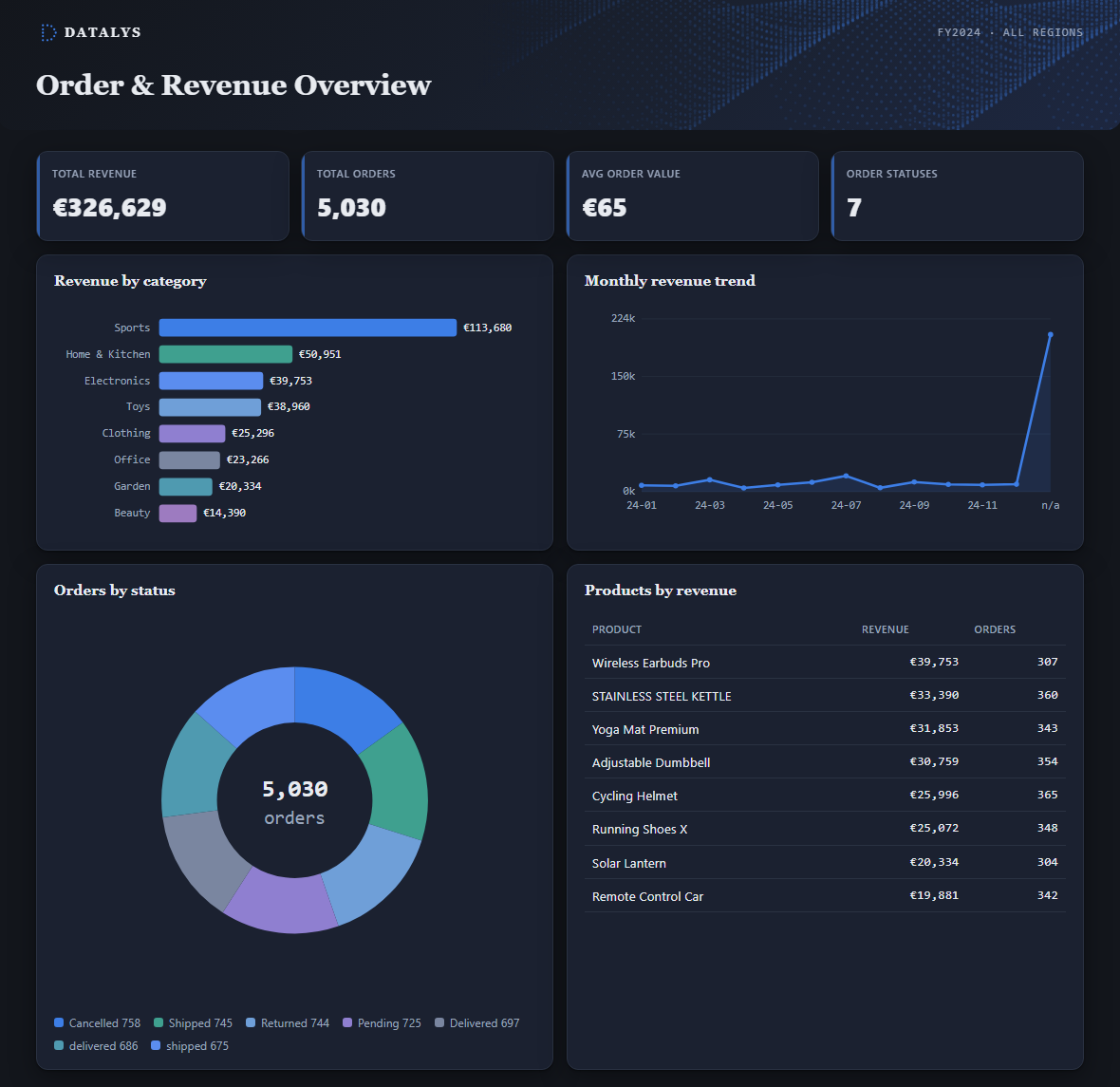
The AI-built dashboard on the raw export, €326,629 in revenue, 5,030 orders including duplicates, seven status slices, and a final month bucket where unreadable dates pile up.
The cause was the price column. Prices arrived as text in several shapes: 80.42, €80.42, 80.42€, € 80.42, EUR 132.46. A dashboard that auto-casts text to numbers by reading the leading characters handles the bare 80.42 and drops the rest. In this run that silently discarded about 3,700 of 5,000 orders from the revenue total, and it did so unevenly across categories, so the shape of the chart was wrong too, not just its height:
| Category | Raw dashboard | After cleaning | Understated by |
|---|---|---|---|
| Sports | €113,680 | €416,190 | 73% |
| Electronics | €39,753 | €170,241 | 77% |
| Home & Kitchen | €50,951 | €132,696 | 62% |
| Clothing | €25,296 | €89,238 | 72% |
| Office | €23,266 | €80,825 | 71% |
| Toys | €38,960 | €80,167 | 51% |
| Garden | €20,334 | €54,521 | 63% |
| Beauty | €14,390 | €30,032 | 52% |
| Total | €326,629 | €1,053,911 | 69% |
The other three charts failed in their own ways. Orders by status showed seven slices instead of five, because Shipped and shipped, Delivered and delivered were counted as separate categories; the same status split in two by nothing more than a capital letter. The revenue-over-time chart grew a final bucket labelled “n/a,” where every date written in a non-standard format piled up because it could not be read as a date, €203,901 of revenue stranded in a column that means nothing. And every count was quietly inflated by 30 duplicate rows that no one had removed.
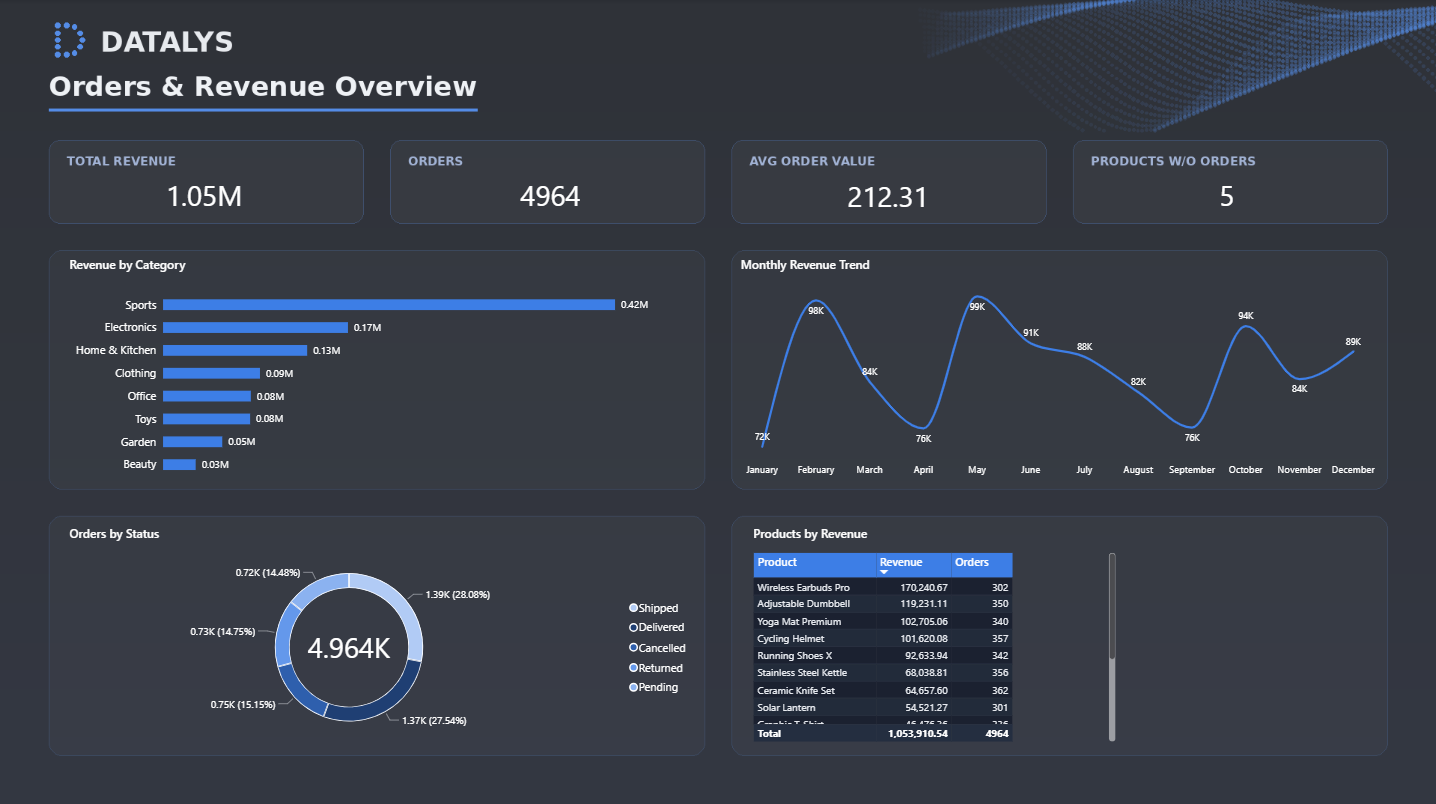
The same questions in Power BI after cleaning, €1.05M in revenue across 4,964 orders, five statuses, and a full twelve-month trend with no “n/a” bucket.
Why a dashboard can’t catch this
A dashboard’s job is to display, not to judge. When it meets a column it does not understand, it makes a quiet assumption and moves on. That is the whole problem: the assumption is invisible, and it is usually wrong.
Four things went wrong in this dataset, and each is a decision the tool made silently on your behalf:
- It guessed at types. Text that looks almost numeric gets coerced to a number, and whatever does not fit becomes a blank. No warning, no row count, no “3,700 values could not be read.” The revenue total simply came out smaller.
- It grouped on exact strings. Shipped and shipped are different text, so they are different bars. The tool has no concept that they mean the same thing; that judgement lives in a person’s head, or in a cleaning rule someone wrote down.
- It never questioned the impossible. A shipping date before the order date, a negative price, a quantity of 10,000; the tool charts them all. It has no model of what is plausible for your business.
- It trusted every row as distinct. Thirty duplicate orders are thirty real orders as far as the chart is concerned. Deduplication is a decision about identity that the tool cannot make for you.
None of these is a flaw in the AI. They are the consequence of asking a drawing tool to do an analyst’s job. The tool draws faithfully. Deciding what the data means, what a customer is, what counts as active, which rows are real, is still human work.
The work didn’t disappear, it moved into view
The comforting story is that AI dashboards replace analysts. This experiment tells a different one. The cleaning that stood between the €327,000 chart and the €1.05 million truth did not stop being necessary; it stopped being hidden. Someone still has to parse the prices, reconcile the status labels, drop the duplicates, and decide which rows are real. That someone is still an analyst.
What changes is where the work sits. It used to happen quietly, upstream, in a spreadsheet nobody kept. Now the tool will skip it unless you do it first, and it will show the result of skipping it to everyone in the room. The pressure moves from “can you build the chart” to “can you trust the chart,” and the second question is harder.
There is a real opportunity in that for anyone who does this well. When three people in a company have three definitions of “active customer,” the dashboard will cheerfully draw all three and never mention they disagree. Noticing that, writing the definition down, and cleaning the data to match it is governance work, and it is exactly the work these tools make visible and urgent. The chart got faster. The thinking behind it did not get optional.
The twist: some of the “errors” were real business events
Here is where cleaning stopped being mechanical and started being analysis. Among the rows the raw dashboard choked on were 23 orders with negative prices. The easy move is to call them errors and delete them. But a negative price with a real customer and a real date is not noise; it is almost certainly a refund.
That reframes the whole row. A refund is not a broken sale to throw away; it is money that left the business, and “how much are we refunding, on what, and how often” is exactly the question a small-business owner wants answered. Deleting those rows would have hidden €6,204 of refunds across 23 orders, a 0.46% refund rate, concentrated almost entirely in one category, Sports.
So the cleaned report grew a second page. The first page, Orders & Revenue Overview, counts only real sales: €1.05 million across 4,964 orders, with the negative and impossible rows kept out. The second page, Refunds & Returns, takes those same negative-price rows and treats them as what they are, refunds, and tracks them in their own right: total refunded, refund rate, refunds by category, refunds over time. Same dataset, two lenses, one report.
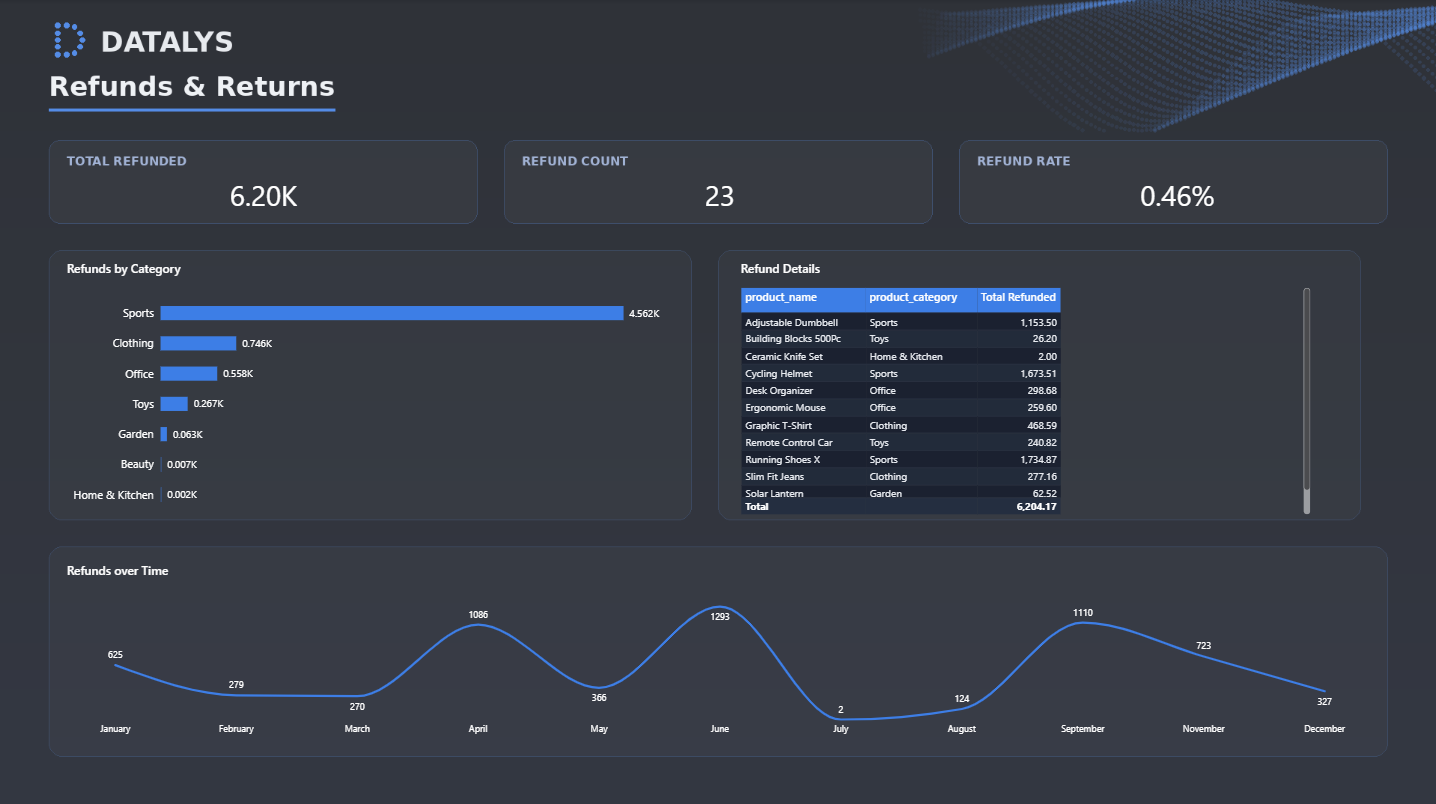
Refunds & Returns, the negative-price rows the raw view buried as errors, tracked as €6,204 of refunds across 23 orders, with Sports carrying €4,562 of it.
That is the part an AI dashboard cannot do for you. It will not look at a negative number and ask whether it is an error or a refund. It will not decide that refunds deserve their own page. That judgement, knowing what the data means for the business, not just what shape it is, is the work. Cleaning was never only about deleting the bad rows; it was about understanding them.
How much should you trust this
This is a demonstration, not a benchmark, and it is worth being clear about its limits.
- The data is synthetic. I built it to contain these specific defects. It shows that a dashboard will chart them; it does not measure how often they occur in any real company’s data. Your mileage will vary with how messy your exports actually are.
- The 69% gap depends on how the tool coerces text. I modelled a tool that reads the leading number of a price and discards the rest, which is realistic for several auto-casting engines but not universal. A tool that strips all non-numeric characters would parse €80.42 correctly and show a much smaller gap, though it would still miss the duplicates, the split statuses, and the impossible dates. Treat the 69% as one plausible outcome, an upper bound on the price problem, not a fixed law.
- Real AI dashboard products do some cleaning. The better ones coerce types and will catch some of this. The argument is not that they do nothing; it is that what they miss is invisible and lands in your chart as if it were true.
- The cleaning logic is tested; the framing is an opinion. The parsing and the numbers are reproducible from the code. The conclusion, that this makes governance work more visible rather than less necessary, is a point of view, not a measured result.
See it yourself
The live dashboard shows all four charts built on the raw export, the same file an AI dashboard would read if you pointed it at the data and started asking questions. Its revenue total reads about €327,000, its “Orders by status” chart carries seven slices instead of five, and its revenue-over-time chart ends with an “n/a” bucket holding every date it could not read. Now put it next to the cleaned Power BI report. Its Orders & Revenue Overview reconciles to €1.05 million across five clean statuses, and its Refunds & Returns page surfaces the €6,204 of refunds the raw view had buried as errors. That gap is the whole argument: same orders, different data quality.
Behind the cleaned report: the parsing, deduplication and flagging that turned this raw export into the Power BI numbers is documented step by step in Snowflake. Cleaning data with SQL →